Curriculum
Algorithmic Foundations: Python Level 1 (Competitive Track)
Session 1
0/4


Session 2
0/4
Session 3
0/4
Session 4
0/3
Session 5
0/3
Session 6
0/2
Session 7
0/0
Session 8
0/0
Session 9
0/0
Session 10
0/0
The Environment & Data Streams
Phase 1: The Professional Workspace
In international competitions, speed and organization are everything. We use Carnets because it uses Jupyter Notebooks (.ipynb). Unlike a normal text file, a notebook allows us to run “Cells” of code one by one. This is how NASA engineers and Data Scientists work.
🛠 Step-by-Step: Setting Up Your Lab
- Download: Open the App Store and install Carnets – Jupyter (the version with the orange icon).
- Initialize: Open the app. You will see a file browser. Tap the “+” icon at the top left.
- Create: Select “New Notebook” and Choose “Python 3”.
- Rename: Tap the title “Untitled” at the top and rename it to
Algorithm_Lab_01. - The First Test: In the first empty box (a “Cell”), type
print("System Online")and press the Play/Run button.

The Story of the Blueprint Imagine building a skyscraper. You don’t just start laying bricks. You need a blueprint where you can test small parts of the building first. Carnets is our blueprint. We test our logic in small “cells” before building the whole “tower.”
Phase 2: Variables & The Memory Vaults
Computers have “RAM” (Random Access Memory). Think of RAM as a giant wall of post-it notes. When we create a variable like player_score = 10, we are telling the iPad to find a specific spot on that wall, label it “player_score,” and stick the number 10 on it.
🧠 Logic Sandbox: The Mental Compiler
In competitive programming, you must be the “Master of the Machine.” Look at the code below without running it. What will the iPad print?
    x = 10

    y = 20

    x = x + y

    y = x - y

    print("The value of y is:", y)
Check your answer: Trace the numbers on a piece of paper first. Does y become 10 or 30?
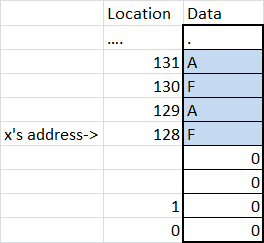
Competitive Tip: In competitions, choosing the wrong data type can make your program slow or crash. We always aim for “Memory Efficiency.”
🛠 Step-by-Step: Variables and output
In a new cell in Carnets, type the following and run it:
age = 11
pi = 3.14159

print(type(name))
print(type(age))
print(type(pi))
Ran into an error? To avoid a NameError which might frustrate a student in their first 20 minutes, make sure the lab instructions tell them to include name = "your name goes here" at the top of that cell.
Phase 3: Input and Output (I/O)
Every algorithm follows a simple rule: Input → Processing → Output.
We use input() to take data from the outside world and print() to show our results. In a competition, your code must read thousands of inputs and print the exact answer in milliseconds.
🛠 Step-by-Step: Create a new cell.
Try to make the computer ask for your birth year and calculate your age:
year_input = input("Enter your birth year: ")

year = int(year_input)

# We must convert text to a number!

current_age = 2026 - year

print("You are", current_age, "years old.")
🚀 Mission Brief: Operation Variable Swap
Mission Objective: Your commander has given you two secret codes stored in variables A and B. You must swap them so that A holds B‘s value, and B holds A‘s value.
The Catch: In high-level competitions, we try to use as little memory as possible. Can you do it without creating a third variable? (This is a famous logic puzzle!)
The Hard Way (The Temporary Variable): Think of two cups: one with Blue juice (A) and one with Red juice (B). To swap them, you usually need a third empty cup (Temp).
💪 Level 1: The Arithmetic Brain-Teaser
Can you swap a = 5 and b = 10 using only addition and subtraction? You are NOT allowed to create a third variable or use Python “tricks.”
Hint: Think of it like a scale. If you add them together first, can you subtract one to get the other?
Level 2: The Competitive Challenge: Can you do it without the third cup? In Python, there is a special “Tuple Unpacking” trick that is very fast in competitions.
a, b = b, a
Lab Tasks:
- Open Carnets and create a notebook named
Session_1_Logic.ipynb. - Create
code_a = 5andcode_b = 10. - Write the logic to swap them.
- Use
print()to prove the swap worked.
code_a = 5
code_b = 10

# your logic goes here...

print("Code A is now:", code_a)
print("Code B is now:", code_b)
Summary & Recap
- The Tools: We configured Carnets and learned how to manage
.ipynbfiles. - Memory: We learned that variables are labeled boxes in the computer’s RAM.
- I/O: We practiced the Input-Process-Output flow.
- Logic: We solved our first “Optimization” problem by swapping data.
👨🏫 Teacher’s Logic Commentary (The “Why” behind the Math)
The “Arithmetic Swap” Explained:
In competitive math, you often have to manipulate equations. The swap we did without a third variable is pure Algebra. Here is how the computer “thinks” through it:
a = a + b(Now ‘a’ holds the sum of both numbers).b = a - b(Since ‘a’ is the sum, subtracting the original ‘b’ leaves us with the original ‘a’. Now ‘b’ is swapped!).a = a - b(We subtract the new ‘b’ from the sum to get the original ‘b’. Now ‘a’ is swapped!).
Lesson: An equals sign in coding (=) isn’t a balance scale like in math; it’s an assignment. It means “calculate the right side first, then store it in the left side.”
The “Mental Compiler” Secret:
Why did we trace the code on paper? In high-level competitions, you don’t have time to run the code 100 times. You must be able to “see” the data moving in your mind. If you can trace x = x + y on paper, you can solve competitive math style questions “Rate” and “Sequence” problems much faster because you are trained to follow the state of a variable as it changes over time.